
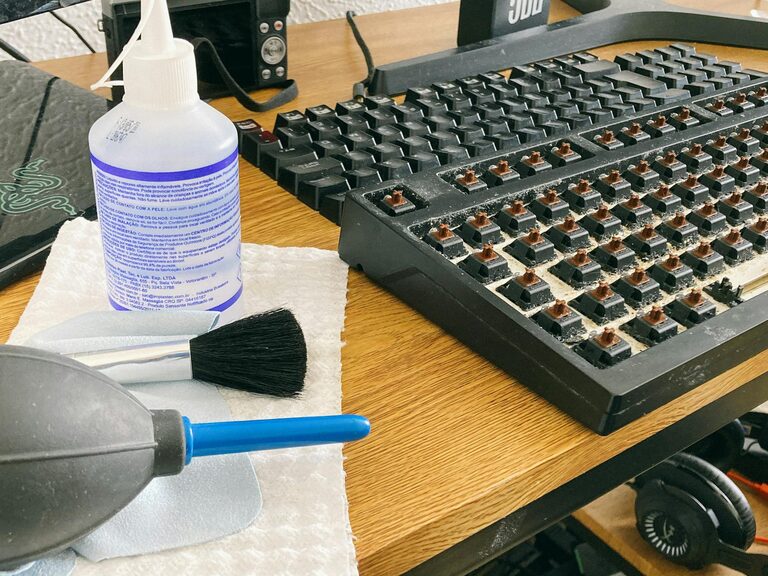
Keeping your phone and keyboard clean is essential—not just for appearance, but also for hygiene and device longevity. These everyday gadgets collect dust, oils, and germs that can affect their performance and your health. However, cleaning them incorrectly can cause damage. This guide will walk you through safe, effective cleaning methods for your phone and keyboard.
Why Cleaning Your Devices Matters
Phones and keyboards are some of the most frequently touched items in our daily lives. Our hands transfer oils, dirt, and bacteria onto their surfaces, which can accumulate over time. While it’s good to wash your hands regularly, it’s equally important to clean these devices:
– Reduce germs and bacteria
– Prevent sticky or unresponsive keys
– Maintain screen clarity and touch responsiveness
– Extend the device’s lifespan
Now, let’s focus on best practices to clean these devices safely.
What You’ll Need
Before you start, gather these supplies:
– Microfiber cloths (very soft, lint-free)
– Distilled water (tap water can leave residue)
– Isopropyl alcohol (70% concentration works well)
– Cotton swabs (Q-tips)
– Soft-bristled brush (e.g., a clean paintbrush or toothbrush)
– Compressed air (optional)
– Small spray bottle (optional, for liquid solutions)
Remember: avoid harsh chemicals, bleach, or abrasive materials that can damage surfaces.
—
# How to Clean Your Phone Safely
Phones have sensitive screens and openings that require careful attention while cleaning. Follow these steps:
Step 1: Power Down
Turn off your phone and unplug it from any chargers or accessories. This reduces the risk of short circuits and accidental taps on the screen while cleaning.
Step 2: Remove the Case
Take off any protective case to clean all parts thoroughly. Cases often collect dirt and germs themselves.
Step 3: Dust and Debris Removal
Use compressed air or a soft brush to gently remove dust from crevices like speaker grills, charging ports, and around buttons.
Step 4: Prepare Cleaning Solution
Mix a 1:1 solution of distilled water and isopropyl alcohol in a spray bottle if you have one. If not, dampen a microfiber cloth lightly with the solution.
Step 5: Wipe the Screen and Body
Gently wipe the screen and body with the dampened microfiber cloth. Avoid excess moisture, and do not spray liquid directly onto the phone. Use gentle, circular motions to clean without damaging the screen.
Step 6: Clean Ports and Buttons
Use dry cotton swabs or a soft brush to carefully clean around buttons and inside ports. Do not insert anything sharp or metal that could damage components.
Step 7: Clean the Case
If your phone case is plastic or silicone, wash it with warm soapy water, rinse, dry thoroughly, and then replace.
Step 8: Let It Dry
Allow your phone and case to air dry completely before turning it on or reassembling.
—
# How to Clean Your Keyboard Safely
Keyboards can harbor dust, crumbs, and germs tucked under the keys. Here’s a safe way to clean them:
Step 1: Unplug or Turn Off Your Keyboard
Disconnect from your computer or turn off the wireless keyboard to prevent accidental inputs or damage.
Step 2: Remove Loose Debris
Turn the keyboard upside down and gently shake it to dislodge loose dust and particles.
Step 3: Use Compressed Air
Use a can of compressed air to blow out debris from between the keys. Hold the keyboard at an angle and spray in short bursts.
Step 4: Brush Between Keys
A soft-bristled brush or an unused clean paintbrush helps sweep out particles stuck under keys.
Step 5: Prepare Cleaning Cloth
Dampen a microfiber cloth with a mixture of distilled water and isopropyl alcohol (70%)—just enough to feel slightly moist but not wet.
Step 6: Wipe Key Surfaces
Carefully wipe the tops of the keys and keyboard surface. Avoid letting moisture seep between keys.
Step 7: Use Cotton Swabs for Tough Spots
Dip cotton swabs lightly in the cleaning solution to reach crevices and edges of the keys.
Step 8: Clean the Keyboard Frame
Don’t forget the keyboard frame—wipe it down with the microfiber cloth too.
Step 9: Dry Thoroughly
Let your keyboard dry completely before plugging it back in or switching it on.
—
# Additional Tips for Ongoing Care
– Wash your hands before using devices to reduce the transfer of oils and germs.
– Clean your devices regularly, at least once a week, or more often in shared environments.
– Avoid eating over your keyboard or phone to prevent crumbs and spills.
– Use screen protectors and keyboard covers if possible, as these are easier to clean and replace.
—
Cleaning your phone and keyboard doesn’t need to be complicated or risky. By using gentle tools, avoiding harsh chemicals, and employing the right technique, you can keep your devices clean, hygienic, and working well for a long time. A few minutes spent cleaning regularly pays off in both health and device performance!